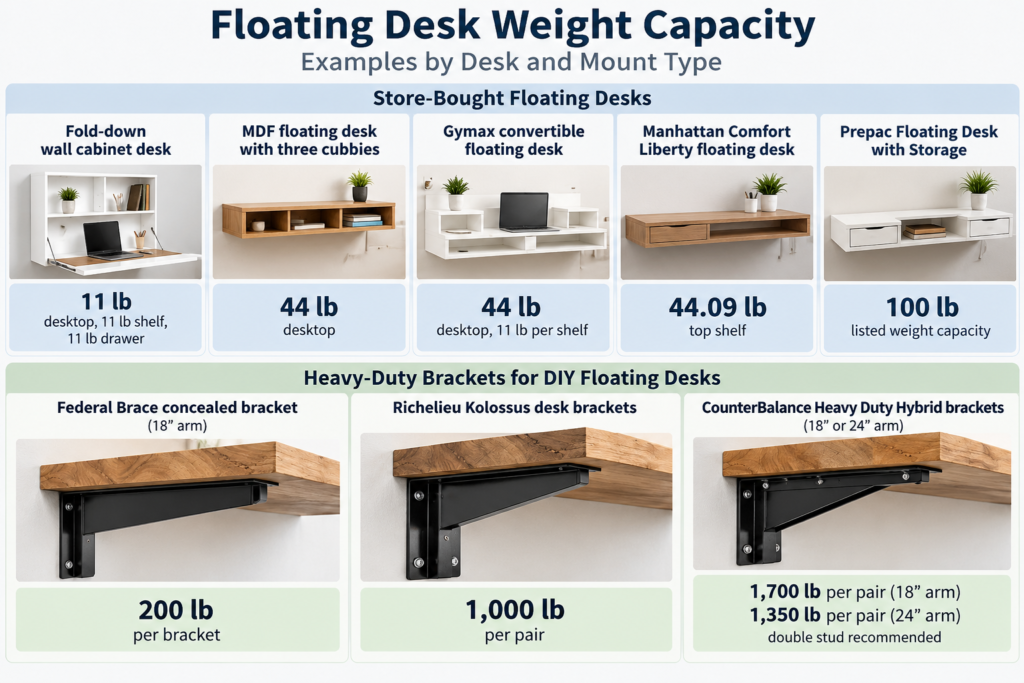
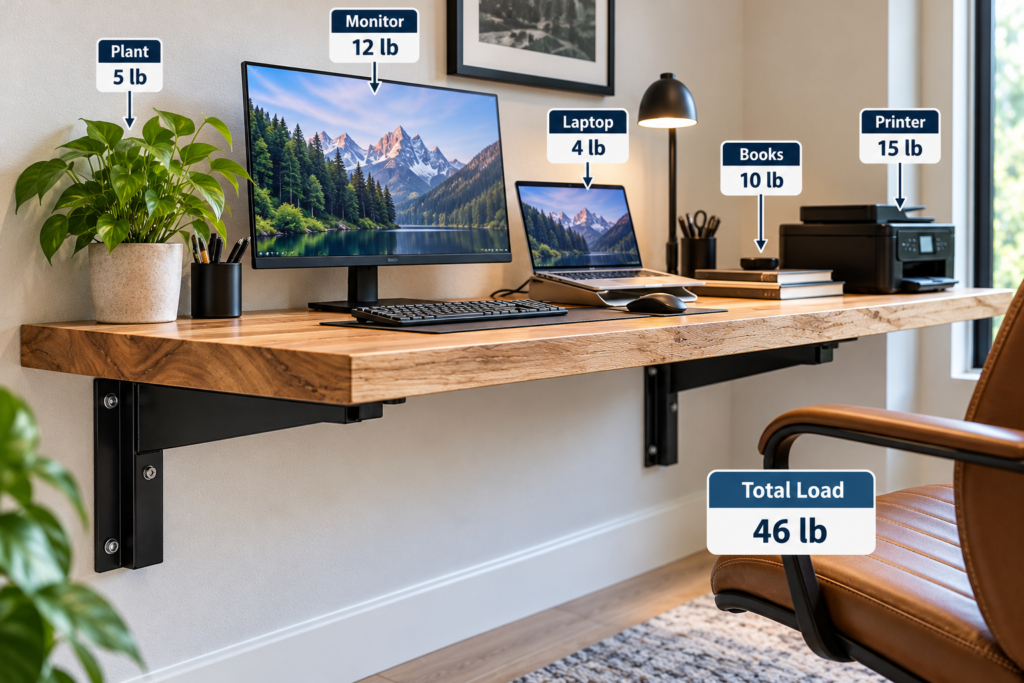
Store-bought floating desks list weight capacities between 11 and 100 pounds in their retail listings. A DIY floating desk on steel brackets screwed into studs can use brackets rated far higher, from 200 pounds per bracket to 1,700 pounds per pair. But no single number on a box tells you what your installed desk can safely hold. Below you’ll find the published ratings, the three parts that limit any floating desk, how to estimate your load, and the setups where a floating desk is the wrong choice.
Quick answer: floating desk weight capacity
Fold-down wall cabinet desks: about 11 lb on the desktop.
Flat-pack floating desks: about 44–100 lb listed capacity, depending on the model. Check whether the listing means the desktop alone or the whole unit.
DIY top on stud-mounted steel brackets: bracket ratings run into the hundreds of pounds. Your studs, screws and top usually set the real limit.
Drywall anchors: the printed numbers are lab failure loads, and Toggler says to use no more than a quarter of them. Even that figure assumes conditions a deep desk doesn’t meet.
Leaning, sitting or pushing up from the desk: count body weight as load, or add legs.
Floating Desk Weight Capacity Chart
These are published ratings from manufacturer and retailer listings, not our test results. Click a rating to see where it was published.
A desktop rating is not the desk’s total capacity. Several listings rate the desktop, shelves and drawers separately, and some don’t say which part the figure covers. A listed number assumes the desk was mounted exactly as the instructions say. It doesn’t tell you how much your particular wall can hold.
A bracket rating describes the bracket only. It doesn’t promise that your studs, screws or desktop will carry the same load.
⚠️ Warning: The longer CounterBalance arm carries a lower rating than the shorter one. The deeper the desk, the harder the load pries the top fasteners out of the wall. Read the rating for the arm length you’re actually buying.
The Three Parts That Limit Every Floating Desk
A floating desk has no legs, so weight travels from the top to the bracket, then the fasteners, then the wall. The weakest link limits the whole desk. Where the weight sits matters too: a heavy load near the wall acts very differently from the same load at the front edge.
1. The wall fastening
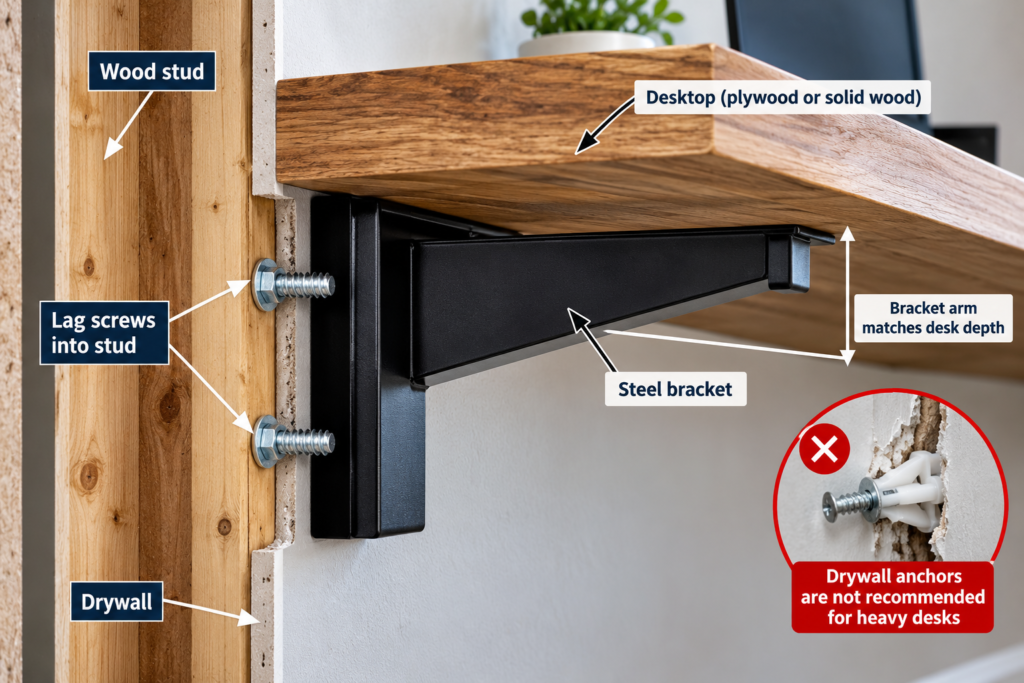
A floating desk doesn’t just push straight down. Weight on the front edge acts like a lever. It tries to rotate the bracket away from the wall, pulling the top fasteners outward while the bottom of the bracket presses in.
That’s why screws into wood studs are the strongest everyday option. Use the screw size and length your bracket maker specifies, not whatever is in the drawer. CounterBalance recommends a double stud for its heavy hybrid bracket.
About hollow-wall anchors: Toggler publishes its drywall ratings as ultimate test loads, the point of failure in a lab. Its technical sheet makes three points:
Use one quarter of those figures for real applications.
The values are guides only and cannot be guaranteed.
Holding strength drops as the load moves farther from the wall.
A deep floating desk puts the load well out from the wall. Even the quarter figure is a starting point, not a rating for your desk.
Anchor in 1/2″ drywall
Published ultimate load
Toggler’s 1/4 guideline
Toggler SnapToggle, 1/4-20 bolt
265 lb
about 66 lb
Toggler SnapToggle, 3/16 bolt
238 lb
about 60 lb
Toggler plastic toggle
159 lb
about 40 lb
Don’t add anchor ratings together to get a desk capacity. On a floating desk, the outward pull lands hardest on the top fasteners, so the anchors won’t share the load equally. Two anchors don’t double what one can hold. If your bracket holes miss the studs, move the brackets onto framing.
2. The bracket
Match the bracket arm to the desk depth. Federal Brace sizes its 18-inch concealed bracket for a shelf no deeper than 20 inches, so the arm should run close to the full depth of the top. A short arm under a deep top leaves the front edge hanging on the plywood alone.
3. The top
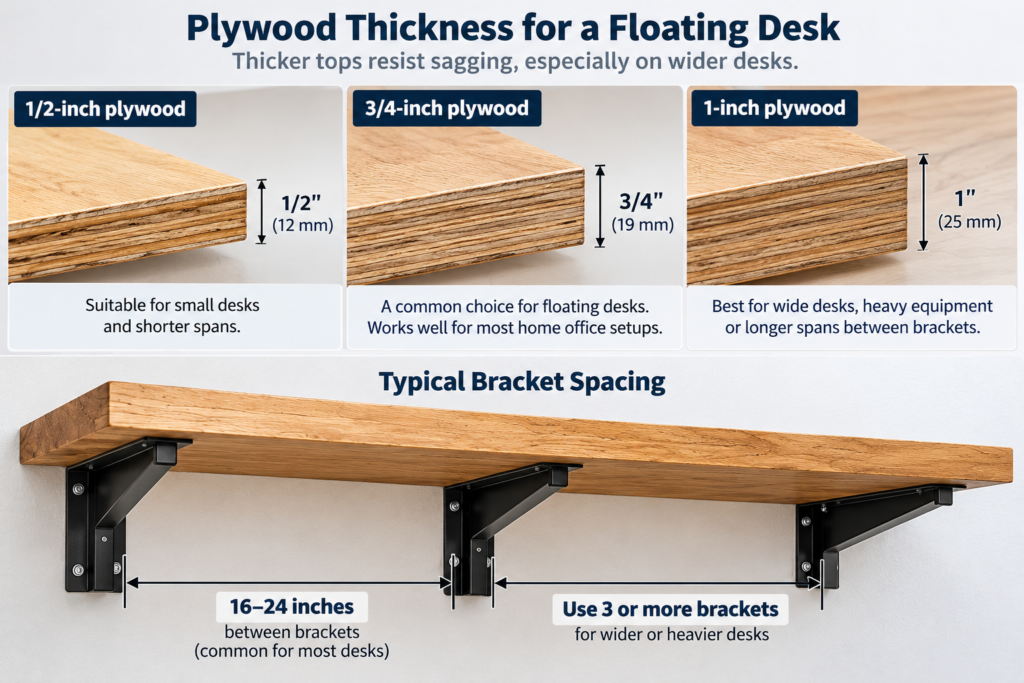
The top has to carry weight between the brackets without sagging. APA’s Panel Design Specification (PDS-2020, Table 10) lists 3/4-inch sanded plywood at roughly 2.5 times the bending stiffness of 1/2-inch. Under the same load, a 1/2-inch top sags about 2.5 times as much.
Gluing two 3/4-inch layers together can make the top much stiffer. Stiffness rises with the cube of thickness, so a double layer approaches eight times the stiffness of a single one. That assumes ideal conditions: a continuous, fully cured glue line across the whole face, so the two layers bend as one piece. Gaps in the glue, screws instead of glue, or a weak bond all reduce the gain. In the worst case the two sheets behave almost like two separate layers.
Bracket spacing matters as much as thickness. WoodBin’s published shelf sag tables show a bare 3/4-inch plywood shelf with clamped ends sagging 0.04 inch at a 30-inch span under 40 lb per foot. At 48 inches, the same shelf sagged 0.26 inch. Our garage shelf span and sag chart has the full numbers.
Those are shelf sag measurements, not floating-desk capacity tests. A desk is usually deeper than WoodBin’s 16-inch shelves, which helps. But desks also carry concentrated loads, like a monitor arm clamped in one spot.
A common starting layout for a 3/4-inch plywood top: brackets on every other stud, about 32 inches apart. Add a third bracket on desks longer than about 60 inches, and confirm against your bracket maker’s instructions.
How to Estimate Your Desk’s Load
Weigh the top. Our plywood weight chart puts a 4×8 sheet of 3/4-inch softwood plywood at about 60–70 lb, or roughly 1.9–2.2 lb per square foot. A 60×24-inch top is 10 square feet, so it weighs about 19–22 lb. A doubled top weighs about twice that.
Weigh your gear. Use a bathroom scale. Weigh yourself holding the monitor, laptop, speakers or printer, then subtract your own weight.
Add a leaning allowance. If anyone will lean on the desk, push up from it or sit on the edge, part of their body weight lands on the front edge. That is the worst spot, the farthest from the wall.
Note where the weight sits. Heavy items near the wall load the fasteners far less than the same items at the front edge.
Compare against each link separately. Check your total against the desk’s listed rating and against the bracket rating for your arm length. If you’re unsure about the wall, assume the wall fastening is the weakest link and mount into studs.
Example (illustrative numbers): a 22 lb top plus 40 lb of gear is 62 lb before anyone leans on it. That already exceeds the 44-lb flat-pack desks in the chart above. It’s also a load where stud-mounted brackets are the sensible choice, not drywall anchors.
💸 Cost difference: Heavy-duty desk brackets plus structural screws generally cost more than a flat-pack desk’s mounting hardware. They’re usually still cheaper than repairing torn drywall and replacing a dropped monitor. Check current prices before you decide.
Affiliate disclosure: theplywood.com is a participant in the Amazon Services LLC Associates Program and earns from qualifying purchases made through the links below, at no extra cost to you.
🛒 48-inch level: lay it across the loaded top to measure sag you’d miss by eye.
When a Floating Desk Is the Wrong Call
Body-weight loads. If someone will use the desk to stand up, transfer from a wheelchair or climb, general retail hardware isn’t designed for that. Use legs, or a mounting system rated and installed for that kind of support.
Kids who climb. A child hanging on the front edge puts a large load at the worst spot. Add legs or skip the floating design.
Plaster and lath, or walls you can’t identify. The anchor figures above are for 1/2-inch drywall. Other walls behave differently.
Metal studs. Wood-screw advice doesn’t apply. Use fasteners rated for steel framing.
Heavy desktop towers or 3D printers. Put the tower on the floor. Constant vibration from a printer works fasteners loose over time.
Rentals where you can’t reach studs. A desk with legs is usually safer than an anchor-only floating desk.
Common Floating Desk Weight Capacity Mistakes
❌ Reading the bracket rating as the desk rating. A 1,000-lb bracket pair is only as strong as the screws and wall holding it. Result: false confidence, then a desk that pulls out of the wall.
❌ Adding up anchor ratings. The outward pull lands hardest on the top fasteners, so anchors don’t share the load evenly. Result: the most-loaded anchor fails first, and the rest can follow.
❌ Treating the “1/4 rule” as a guarantee. Toggler calls its figures guides that cannot be guaranteed, and holding strength drops as the load moves away from the wall. Result: you plan for capacity a deep desk doesn’t have.
❌ Short bracket arms under a deep top. Federal Brace sizes an 18-inch arm for a top no deeper than 20 inches. Result: a front edge that sags or cracks where you rest your arms.
❌ Brackets too far apart. In WoodBin’s published tables, bare 3/4-inch plywood went from 0.04 inch of sag at 30 inches to 0.26 inch at 48 inches. Result: a visible dip in the middle that worsens over time.
❌ Drywall screws in the brackets. Drywall screws are made to hold drywall, not structural loads, and they can snap. Result: a bracket that lets go without warning.
😬 Regret: WoodBin’s sag guidance assumes a loaded wood shelf sags about 50% more over time. A desk that looks only slightly low on day one can be noticeably bowed a year later.
🧪 Real test you can run to check sag: Before loading your gear, set weighed sandbags or bagged water bottles on the top, roughly matching your planned load and where it will sit. Lay a long level across the top and note the gap at mid-span. Check again after a day.
Watch for anything that changes:
sag that keeps growing
bracket screws that shift
cracks in the drywall around the brackets
Any of these means you need more studs, better fasteners, closer brackets or legs. This test only shows how the top bends. It doesn’t prove the desk is safe: surviving a day under load says nothing about long-term creep, a sudden impact, or someone leaning hard on the front edge.
If you’d rather keep the desk movable, a French cleat wall lets you hang a desk shelf that lifts off. The same rule applies: fasten the cleat into studs, not drywall. For finishing ideas once it’s up, see our DIY plywood furniture that looks expensive.
Floating Desk Weight Capacity: FAQ
How much weight can a floating desk hold? Store-bought models list weight capacities from about 11 to 100 lb. A DIY desk on stud-mounted steel brackets can use brackets rated far higher. What any installed desk can safely hold depends on the wall fastening, bracket, top and where the weight sits.
Can a floating desk hold a monitor and a desktop computer? Often, if you weigh the gear and stay within every rating in your setup. Mount the brackets into studs, and keep the tower on the floor when you can.
Can I mount a floating desk without studs? For a light laptop shelf, heavy-duty hollow-wall anchors may work. Toggler says to use no more than a quarter of the printed rating and can’t guarantee even that, and holding strength drops as the load moves away from the wall. For a loaded desk, mount into studs.
How thick should a floating desk top be? 3/4-inch plywood is the usual minimum. By APA’s design values it’s about 2.5 times stiffer than 1/2-inch. For long spans or heavy loads, adding a bracket usually helps more than adding thickness. A glued double layer helps a lot only if the glue line is continuous.
Can I lean on a floating desk? Only if the setup is designed for that load at the front edge. If someone will push up from it or sit on it, add legs or use hardware rated for that kind of support.
Bottom Line
No single number tells you what a floating desk can hold. Store-bought models list weight ratings of about 11 to 100 lb, and those ratings assume correct installation. For a DIY desk, capacity depends on four things: the bracket’s rating at your arm length, solid fastening into studs, the top’s stiffness between brackets, and where the weight sits. Weigh your load, keep heavy items near the wall, mount into framing, and add legs if anyone will lean on it.
Exterior Plywood Lifespan: How Long Each Type Lasts Outdoors by Admin August 21, 2026 DIY Exterior plywood has no single outdoor lifespan. Covered sheathing that remains dry can remain serviceable for the life of the surrounding assembly, while permanently exposed…